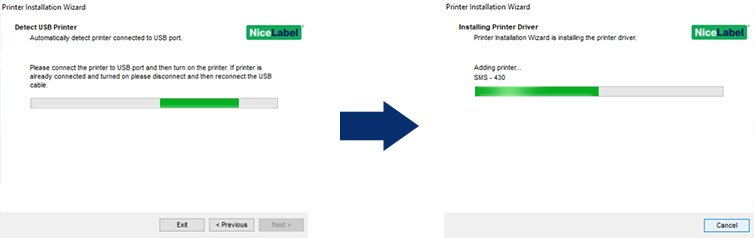
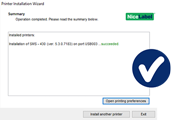
Here are the steps for installing the printer driver via USB. Get your printer ready but do not switch it on and do not connect it to your computer yet. Now follow the installation wizard (Click to enlarge) Choose (Click to enlarge) Connect the printer to your PC via the USB cable, then turn the printer (Click to enlarge) The wizard will recognise your SMS printer and after this, the printer driver will be installed automatically! Here are the steps for installing the printer driver via USB. Get your printer ready but do not switch it on and do not connect it to your computer yet. Now follow the installation wizard (Click to enlarge) Choose (Click to enlarge) Connect the printer to your PC via the USB cable, then turn the printer (Click to enlarge) The wizard will recognise your SMS printer and after this, the printer driver will be installed automatically! Install the NiceLabel software so that you can design and print labels. Download your software version below and start the installation file. Go through the installation and select the option: (Click to enlarge) Enter your license code and click Next (Click to enlarge) Decide which software modules you want to install and click on Next (Click to enlarge) Decide where you want to install NiceLabel and select Next. The software will now be installed. Once the installation is complete, launch the NiceLabel Designer application using the shortcut on your desktop. You will now see the activation wizard: (Click to enlarge) Install the NiceLabel software so that you can design and print labels. Download your software version below and start the installation file. Go through the installation and select the option: (Click to enlarge) Enter your license code and click Next (Click to enlarge) Decide which software modules you want to install and click on Next (Click to enlarge) Decide where you want to install NiceLabel and select Next. The software will now be installed. Once the installation is complete, launch the NiceLabel Designer application using the shortcut on your desktop. You will now see the activation wizard: (Click to enlarge) NiceLabel settings Open NiceLabel Designer and goto File>Options Click on tab Designer At Opening modus selection option Display each document in its own window. ClickOK to save the changes NiceLabel settings Open NiceLabel Designer and goto File>Options Click on tab Designer At Opening modus selection option Display each document in its own window. ClickOK to save the changes Watch the instructional videos to familiarise yourself with your printer and software.Getting started with your
SMS-830

Would you like to set up the printer for use via a LAN connection afterwards? Then watch the relevant instruction video (Step 6 | Instructional videos).1
2
Download
the SMS printer driver and extract the SMS-Printer-Drivers-V10.zip file and start the PrnInst.exe installation file
(Make sure you install the .exe installation file with administrator rights)
3

4
Install Printer Driver
and select the option
USB port

5
ON
(Failed to install? Contact support@rebo.nl or call +31 (0)35 – 2400 137)
Would you like to set up the printer for use via a LAN connection afterwards? Then watch the relevant instruction video (Step 6 | Instructional videos).1
2
Download
the SMS printer driver and extract the SMS-Printer-Drivers-V10.zip file and start the PrnInst.exe installation file
(Make sure you install the .exe installation file with administrator rights)
3
4
Install Printer Driver
and select the option
USB port
5
ON
(Failed to install? Contact support@rebo.nl or call +31 (0)35 – 2400 137)
Tip: Have your NiceLabel licence code ready.1
NiceLabel 10
NiceLabel 2019
(Error when downloading? Right-click and select “Save as”)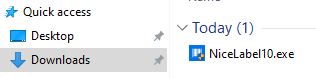
2
Software licence or Hardware licence and click Next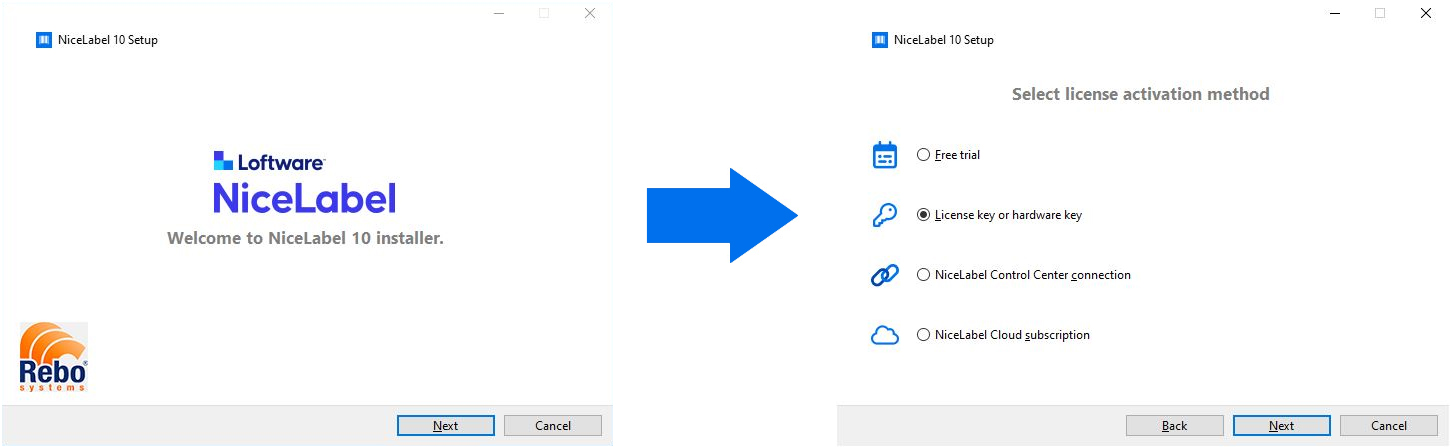
3
You will receive the licence code by email and it will also be stated on the delivery note and invoice.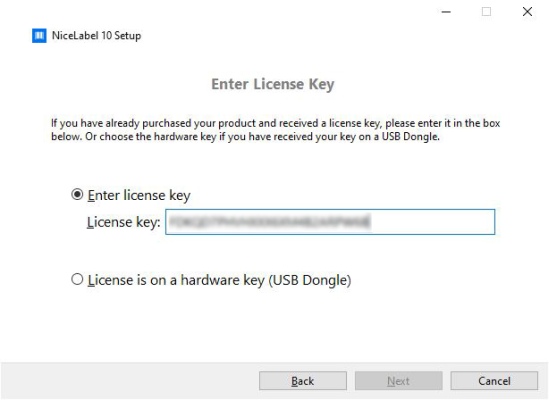
4
(Do you have a PowerForms Suite licence and concerns installation on a workstation on which Automation will not run: then turn the Automation module off)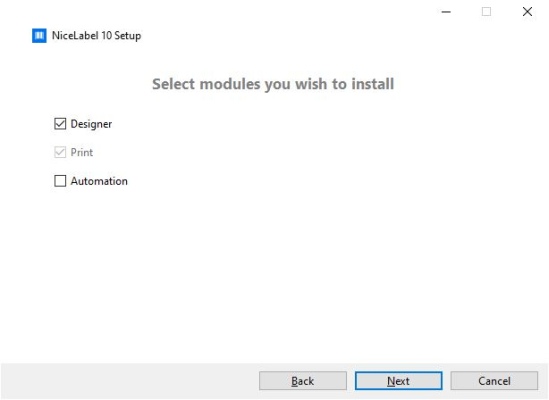
5

6

7
Under Activate licence, click on Activate
Under Licence Key, click Activate
Fill in your details and click on Activate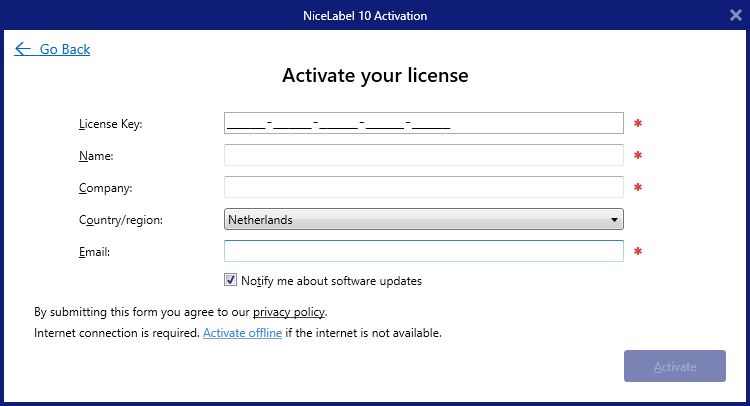
Tip: Have your NiceLabel licence code ready.1
NiceLabel 10
NiceLabel 2019
(Error when downloading? Right-click and select “Save as”)2
Software licence or Hardware licence and click Next3
You will receive the licence code by email and it will also be stated on the delivery note and invoice.4
(Do you have a PowerForms Suite licence and concerns installation on a workstation on which Automation will not run: then turn the Automation module off)5
6
7
Under Activate licence, click on Activate
Under Licence Key, click Activate
Fill in your details and click on Activate
Perform the following steps:1
2
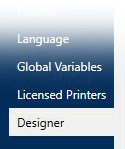
3
At Source printer settings selectoption Printer settings saved in the label .
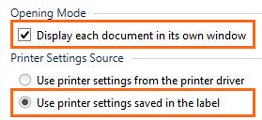
4
Perform the following steps:1
2
3
At Source printer settings selectoption Printer settings saved in the label .
4
Do you have questions that are not answered here? Please contact our support department.NiceLabel basics
Learn the basics about objects, tools, alignment and variable data integration.
Excel database connections
See how to establish an Excel database connection with variable data.
Getting started!