Table of contents
Installing the Ribbon Cassette #
- Ensure that the black closed hubs of the cassette are facing towards you and the open hubs are facing towards the printer.
- Ensure that the flat side of the cassette is facing upwards. The arrow labels should be on the top side, with the arrows pointing towards the printer.
- Insert the ribbon cassette into the designated slot on the side of the printer. If you notice any resistance, remove the cassette and check that it is positioned correctly.

Installing the Tape Roll #
Note: Before installing the tape roll, make sure the printer is powered on and a ribbon cassette is loaded.
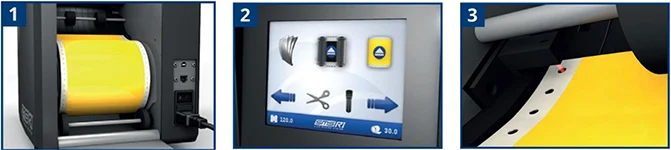
- Open the transparent rear cover and place the tape roll inside with the printable side facing upwards.
- The printer will now detect that a tape roll has been installed.
- Manually feed the leading edge of the tape into the printer until it is detected. The printer will then automatically feed the remaining material.